WorkAI Refinement WorkflowValidated
AI interfaces make generation easy, but refinement remains difficult.
- Role
- Lead Designer
- Team
- 3 designers on refinement use case
- Timeline
- August 2025 to January 2026
- Tools
- Figma · Maze · Usability testing · Medium
Overview
As part of Carnegie Mellon University’s UI for AI initiative, we designed interaction patterns that give people more control over refining AI-generated ideas instead of repeatedly starting over.
My role
I led a team of three designers exploring how designers and writers refine AI-generated work, guiding our research, design explorations, and prototyping.
Problem
Users shouldn’t have to choose between restarting and manual editing.
AI tools generate quickly, but refinement often breaks down after the first draft. Users are left choosing between regenerating everything or editing manually.
How might we support refinement across multiple levels while preserving structure and user intent?
Research
Research showed users needed refinement they could see and control.
I analyzed existing AI tools and refinement workflows to understand how users maintain control while iterating on generated content. Existing systems tended to prioritize either broad exploration or precise edits.
Localized editing
Users could refine one area without changing the rest. Inspired by Adobe Firefly / Generative Fill.
Structured refinement
Users could refine content at multiple levels. Inspired by SpecifyUI.
01Support multi-level refinement
Users naturally switched between broad revisions and precise edits.
02Preserve structure during refinement
Participants wanted to improve selected content without losing surrounding work.
03Keep users in control
People needed clearer visibility into what AI changed before accepting edits.
Users rarely accepted first outputs.
“Show me what changed so I can make the call myself.”
Concept testing
Testing refinement interactions pointed toward one clear workflow
We tested mid-fidelity prototypes with users through interviews and task-based walkthroughs focused on refinement workflows. Participants completed tasks across broad edits, detailed editing, merge workflows, and version history interactions while sharing where friction occurred.
My concept was selected because it supported both broad and precise refinement without interrupting workflow.
Overall refinement
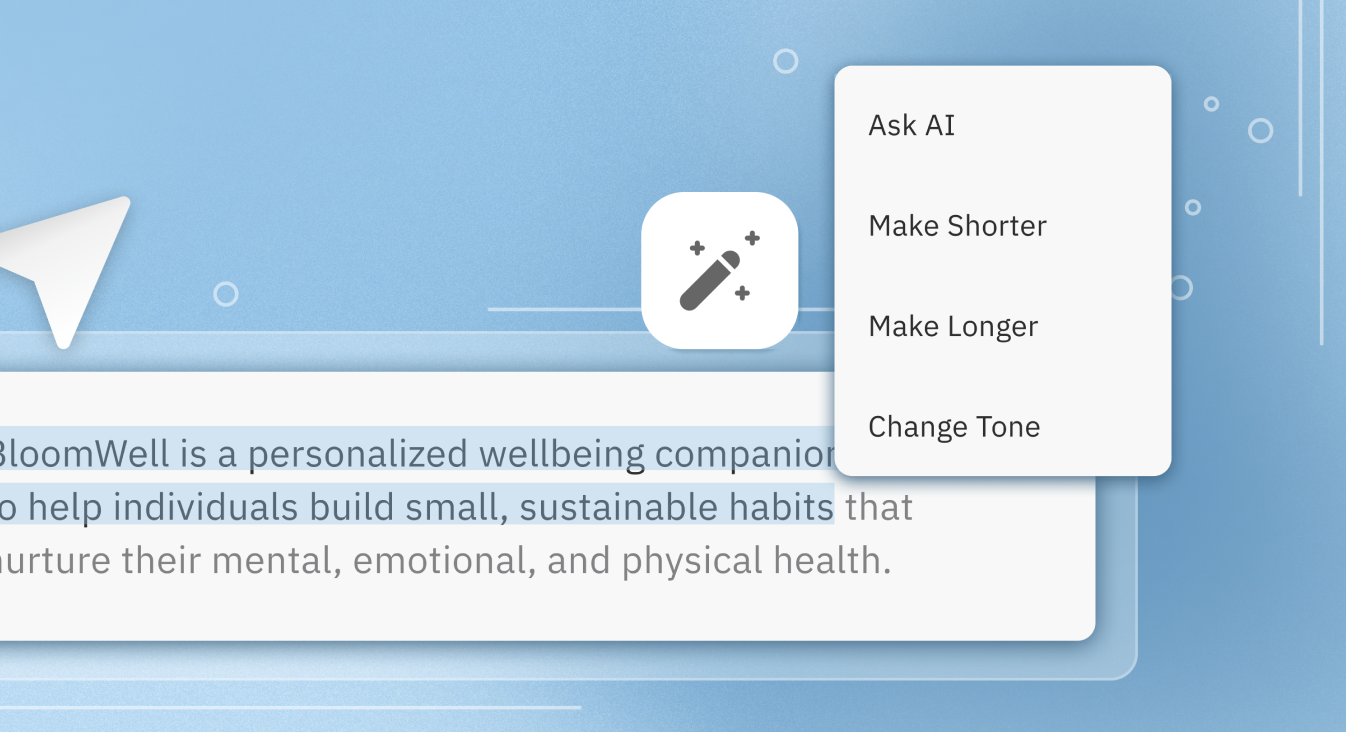
Broader changes like rewrite, merge, tone, or structure.
Inline selection
Highlight exactly what needs refinement.
Inline refinement
Refine selected content without regenerating everything.
Decisions
Three design decisions made AI refinement more controllable.
Instead of optimizing for better first outputs, we explored how users could refine AI-generated content while preserving structure, intent, and momentum.
01
Designed refinement at multiple levels
Users shifted between revising entire responses and fine-tuning individual words.
02
Replace regeneration with targeted refinement.
“It rewrote my intro without asking.”
Before · Whole output regeneration
Regenerating full outputs often overwrote parts users wanted to keep.
After · Selected-region refinement
Enabled targeted editing so users could refine selected regions without changing the rest.
03
Version visibility made refinement easier to evaluate
Added side-by-side version comparison and navigation.
Users could judge AI changes before committing to them.
Solution
Supporting refinement without restarting
We designed a refinement workflow that combined broad edits, targeted changes, and version comparison so users could steer AI outputs without losing context or starting over.
Prototype testing
Testing validated the refinement workflow.
Maze testing validated that users understood the refinement model and successfully completed tasks across overall refinement, inline refinement, and comparison workflows.
Key takeaway: Users preferred inline refinement. Participants consistently preferred localized edits over repeated prompting.
100%
Task completion across core refinement tasks
Users completed overall refinement, inline editing, and comparison tasks successfully.
0%
Misclick rate during refinement tasks
No navigation or shortcut confusion appeared during testing.